

How to create a Social Media Plan
- Jul 18
- 3 min read
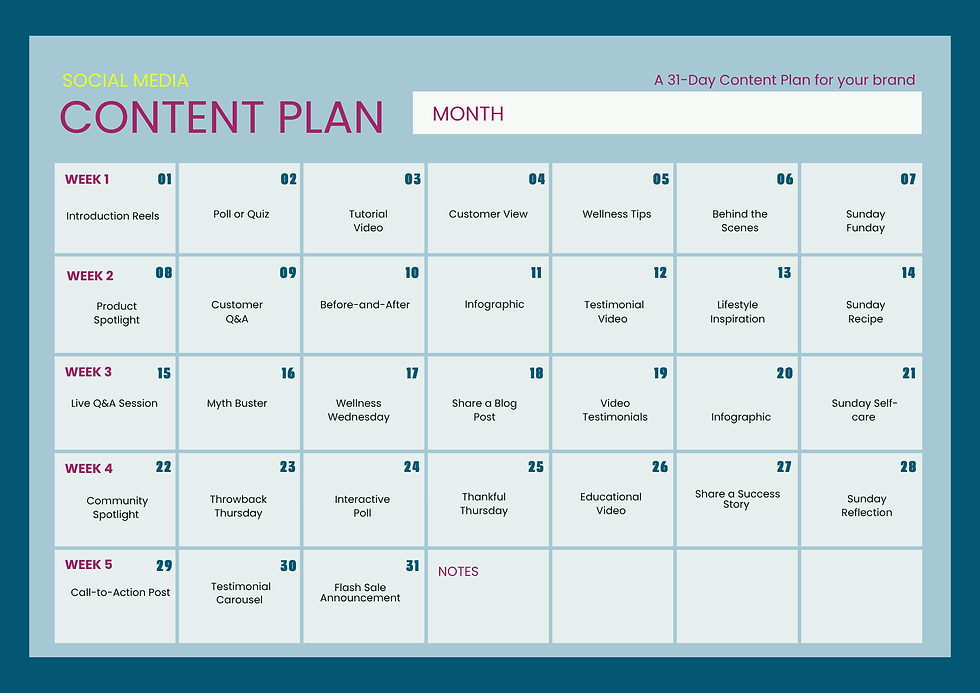
Creating content consistently can feel overwhelming, but having a clear social
Start with a social media calendar
The first step in learning how to create a social media plan is to download or print a calendar. There are plenty of free options available online, and Canva offers a wide selection of customisable calendar templates.
Depending on how organised you want to be, you may choose to print or download all 12 months of the year. Having a visual overview of your content allows you to plan ahead and avoid last-minute posting.
Add important dates and events
Next, research upcoming national and international awareness days that relate to your business. You can use Google to find these dates or even use AI tools to help identify relevant events throughout the year.
These dates can be useful for:
Seasonal promotions
Raising awareness of important causes
Creating engaging content
Relating trending topics to your business
For example, a social media agency might create content around Social Media Day, while a website designer could use World Creativity and Innovation Day as inspiration.
Add any relevant dates directly onto your calendar.
Plan your business content
Now it's time to fill your calendar with content ideas from your business.
Think about the information you already have available, such as:
Testimonials
Customer reviews help build trust and show potential clients what others think about your products or services.
Case studies
Share successful projects and explain the challenges, solutions, and results.
Call to actions
Encourage your audience to take action, whether that's visiting your website, booking a consultation, or contacting you for more information.
Photos and videos
Use images of your work, team, products, services, or behind-the-scenes content to create a more personal connection with your audience.
Include upcoming events and networking
Don't forget to add any events, exhibitions, networking meetings, or community activities you have planned.
These make excellent content opportunities and help showcase the human side of your business.
Posting photos and updates from events can also increase engagement and strengthen relationships with your audience.
Create branded Canva templates
Once you have your content ideas, create a set of reusable Canva templates.
Include:
Your logo (preferably with the background removed)
Your brand colours
Brand fonts
High-quality images
Consistent layouts
Using templates helps maintain a professional appearance and significantly reduces the time needed to create future posts.
Write engaging captions
Each post should include a caption that encourages interaction.
Good examples include:
What are your thoughts on this?
Have you experienced something similar?
Let us know in the comments below.
Which option would you choose?
Remember that not every post should be focused on selling. If every post is promotional, audiences can quickly lose interest. A healthy mix of educational, entertaining, and promotional content generally performs much better.
Use hashtags correctly
Instagram currently recommends using around three relevant hashtags per post rather than filling captions with large numbers of hashtags.
When creating hashtags, use capital letters at the beginning of each word. This improves readability and can help search engines better recognise individual words.
For example:
Schedule your content
Once your content is ready, scheduling tools can save a huge amount of time.
Meta Business Suite
Meta Business Suite allows you to schedule content to Facebook and Instagram in advance. However, posts can only be scheduled up to 30 days ahead, so you'll need to revisit your schedule each month.
Multi-platform scheduling tools
There are also paid scheduling platforms that allow you to publish content across multiple channels simultaneously, including:
LinkedIn
Google Business Profile
Facebook
Instagram
These tools can be particularly useful if you're managing several social media platforms.
A Social Media Plan saves time
Knowing how to create a social media plan can transform the way you manage your marketing.
By creating a calendar, planning content in advance, designing branded templates, and scheduling posts ahead of time, you'll spend less time worrying about what to post and more time focusing on running your business.
The initial planning takes some effort, but once your social media calendar is complete, the hard work is done and you can enjoy a much more organised and stress-free approach to content creation.
Still sounds overwhelming?
Need help to create a social media plan?
Creating and managing a social media plan takes time, creativity, and consistency. If it all sounds like another task on an already busy to-do list, we can help.
From content planning and graphic design to caption writing and scheduling, we can take the stress out of social media management, allowing you to focus on running your business.
Ready to hand it over? Get in touch today and let us take social media off your hands.


